
Environments
What is an Environment?
Section titled “What is an Environment?”An Environment is a feature of Sims 4 Editor that allows you to have multiple copies of your mods, saves, and tray (gallery items) folders, then swap between them with the click of a button. Switching is instant even with large folders!
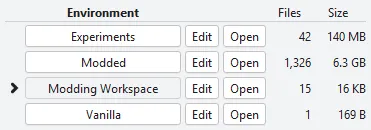
You know how some games have a concept of mod packs? It’s a bit similar to that.
This feature DOES NOT allow you to use multiple game versions. Update your game, then update all mods like you normally do.
How it works
Section titled “How it works”Sims 4 loads your mods, saves, and tray folders from ../Documents/Electronic Arts/The Sims 4/. When switching environments, S4E will move these folders to ../The Sims 4/Environments/[EnvironmentName]/, then move the new environment’s files into the game’s main folder.
Here’s an example using two environments, Gameplay and Modding, with the files from Gameplay highlighted. Other folders, like tray and cache files, are omitted for brevity.
Directory
Sims 4DirectoryMods
- Mod1.package
- Mod2.package
DirectorySaves
- GameplaySave.save
DirectoryEnvironments
DirectoryGameplay
- … This is empty because it is the active environment
DirectoryModding
DirectoryMods
- TestingMod.package
DirectorySaves
- TestSave.save
Directory
Sims 4DirectoryMods
- TestingMod.package
DirectorySaves
- TestSave.save
DirectoryEnvironments
DirectoryGameplay
DirectoryMods
- Mod1.package
- Mod2.package
DirectorySaves
- GameplaySave.save
DirectoryModding
- … This is empty because it is the active environment
Swap between Gameplay and Modding to see the effect. The active environment folder is always empty since its files are in the main folder, while all other environment folders contain copies of game files that aren’t in use and will be ignored by Sims 4.
The complete list of folders that are move:
ModssavesTray- Gallery ItemsSims 4 Editor Cache- Editor cache files
Troubleshooting
Section titled “Troubleshooting”This feature only moves the folders listed above, doesn’t allow overwriting, and will attempt to undo any partial moves if something goes wrong like a file being in use.
If something still somehow goes wrong and folders end up in the wrong location, manually move them to where they should be using the information above, resync in S4E, then report the bug.