
Tuning Concepts
Sims 4 is very data driven, so one of the primary ways of modding is writing XML tuning files. While this sounds easy, and mostly is, there are some very important nuances to understand.
Core Concepts
Section titled “Core Concepts”To properly grasp tuning mods, we need to understand 4 terms: Tuning XML, Tuning Descriptions, Combined Tuning, and SimData.
Tuning XML
Section titled “Tuning XML”The end goal is creating XML snippets that either define new game data or override existing game data. Here’s a practical example of tuning that defines a new trait.
<?xml version="1.0" encoding="utf-8"?><I c="Trait" i="trait" m="traits.traits" n="ZMilla:Trait" s="3678950568"> <T n="display_name">0x2D954A47</T> <T n="icon">2f7d0004:00000000:8075ca84a3cefd11</T> <T n="trait_description">0x045E761F</T> <E n="trait_type">PERSONALITY</E></I>We’ll go into much more detail later, but even at a glance it should be obvious that this XML defines a trait with a display_name, icon, trait_description, and trait_type.
Tuning Descriptions
Section titled “Tuning Descriptions”To understand how to actually write valid tuning XML, EA releases a separate set of XML files that describe the tuning XML structure called Tuning Descriptions. These are normal XML files, but they use the .tdesc file extension.
These files are purely documentation and are not meant to be read directly. They are meant to be viewed by tools like Sims 4 Editor or tdesc.lot51.cc. For example, the Trait.tdesc file for the 7 line snippet above is over 5,000 lines long. Some files are 40,000+, and there are 1,500+ files.
Tuning description versions update periodically, but not as often as the game version.
Describing a Node
Section titled “Describing a Node”While you’d normally use Lot51 or S4E to read a description in a formatted way, let’s look at the actual .tdesc XML description of just the display_name field from the previous example to see what we can learn.
<Tunable name="display_name" display="Display Name" class="TunableLocalizedString" type="int" default="0x0" description="The trait's display name. This string is provided with the owning Sim as its only token." allow_none="True" Deprecated="False" export_modes="client_binary,server_binary,server_xml" filter="0" group="Appearance"/>The node itself is called Tunable, which indicates this field stores a single value and uses a T node. There are 6 kinds of nodes in total, such as TunableList (L) and TunableVariant (V), which will be discussed until later.
The class attribute is TunableLocalizedString, which means this is a key for an entry in a string table. The type is int, meaning the actual value should be an Integer, which we’ve written as hex in the first example (0x2D954A47).
The allow_none field is true and default_value is 0x0, meaning the entire display_name node isn’t even required and will default to 0. Come on though, are you really not going to name your trait?
The description field includes the phrase “This string is provided with the owning Sim as its only token.” indicating we can use string replacement with the Sim that owns the trait.
The Entire Description
Section titled “The Entire Description”To be clear, the last section was just for a single node. The Trait description has dozens of nodes.
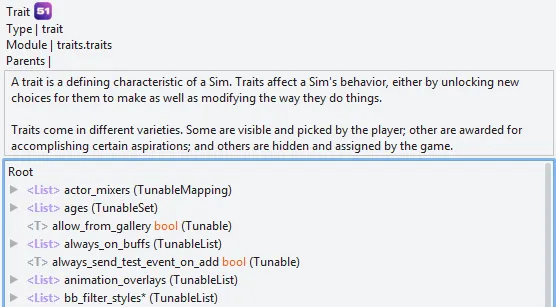
If you want to explore the Trait description, or any other of the hundreds of descriptions, you can do so on Lot51 or in Sims 4 Editor, but we won’t look at this more until later.
Combined Tuning
Section titled “Combined Tuning”The Sims 4 contains over 100,000 XML tuning snippets. Individual files are slow to load, so they are compressed into much larger files called Combined Tuning. This means in order to browse the game’s XML tuning files, we first need to extract them back into individual files.
Extracted tuning files are useful if you want to create overrides, use a game tuning as a template instead of building a new tuning from scratch, or just learn how things work.
While several tools can do this, Sims 4 Editor includes a combined extractor and browser. Alternatively, you can use tdesc.lot51.cc to browse the files online without extracting.
SimData
Section titled “SimData”SimData is a custom binary format. SimData is not XML. However, it can be converted to and from XML using tools like Sims 4 Editor and Sims 4 Studio.
Some fields in a tuning file require their data to be defined a second time in a SimData file. Which fields are required, if any, is defined in the .tdesc description files. This is shown on tdect.lot51.cc as an icon, and in S4E as an asterisk * (will likely switch to a similar icon later).
Question: Why?
Answer: Two different parts of the game engine want the same data but in different formats. SimData is very high performance when reading, and has guaranteed default values.
Extracting & Browsing
Section titled “Extracting & Browsing”You can extract and browse tuning files on your computer using your own game files, or view pre-extracted files online. I strongly suggest both methods.
Sims 4 Editor
Section titled “Sims 4 Editor”From the home screen:
- Extract -
Combined Tuning > Manage Tuning... > Extract Tuning Files - View -
Combined Tuning > [VERSION]
Lot51’s Tuning Builder is an a online tool that can view and edit tuning files, browse tuning descriptions, and has a lot of other awesome features. Check it out at tdesc.lot51.cc.