
Mod #2 - No Overheat
You know how when you start a game in Oasis Springs (the desert map), your Sim is immediately dying of heatstroke? I hate that, so let’s fix it.
Finding the File
Section titled “Finding the File”Somewhere in the game files is a tuning file that controls the overheating interaction, but where on earth is it? We know the popup contains the phrase “burning to death”, so let’s start there.
- In Sims 4 Editor, open the String Table Browser
- Search the phrase “burning to death”
- There are 3 results, but the one we are looking for starts with
{0.SimFirstName} is burning to deathand has the key0x718198DE. - Selecting this entry shows us any tuning files that reference this string, which in this case is
action\loot_Notifications_TemperatureDeaths_Burning. Click it to open in in the tuning browser.
This tuning has a class of LootAction, which has a fairly generic description of A list of loot operations. In Sims 4, loot essentially means anything you can receive as a response to something, good or bad. Sure enough, looking at the description tree, the tuning contains only a single <List> node called loot_actions. Clicking the variant dropdown shows us this list can contains hundreds of different data types, including buffs, payments, weather, and more.
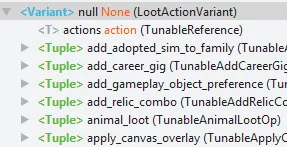
Looking back at the actual XML we see it uses the variant notification_and_dialog, references some audio, and references the string we used to get here. This is just the annoying popup and nothing more. We need to keep digging.
Click the Usage button at the top, which shows files that reference this file. A single result, commodity_Death_Temperature_Burning. Click to open it. Success.
Understanding the File
Section titled “Understanding the File”This is perhaps the most important step of tuning modding.
First, we can see c="Commodity", so the Commodity.tdesc is loaded. It has the following description:
Represents any commodity that has a value and changes over time. This class updates lazily, which means it generally only processes change when either a new delta is added, a delta is removed, or someone tries to inspect the value of the commodity.
A little technical, but a value that changes over time seems like a good takeaway. Let’s continue exploring by clicking around the XML. The tree on the right will automatically select the corresponding root node, which in turn shows the node’s description at the bottom. Read the names of the nodes present in the file, their descriptions, and see if you can understand what is happening.
Challenge #1
Section titled “Challenge #1”Can you understand this file without me explaining it?
Solution #1
Section titled “Solution #1”- This tuning tells the game to track a variable with a range of
0-100 - It naturally wants to converge to
0 - When the variable reaches
2, a notification will appear - When it reaches a value of
100, it triggers a failure interaction ofdeath_Overheat, which presumably kills the sim - It decays at a rate of
0.208 - It has several usages, which are most likely other tuning files that cause the variable to increase, since it never appears to increase on its own
This matches what we see in game. Do something that causes the Sim to get hot, get a notification, then die. A tale as old as time.
Editing the File
Section titled “Editing the File”In the future you’ll likely be able to import this file directly into a package, but for now we’ll be using Lot51.
- In tdesc.lot51.cc, click
Import EA Tuning - Search
commodity_Death_Temperature_Burning, select it, then clickImport & Edit
Challenge #2
Section titled “Challenge #2”Can you figure out what changes to make to fix the issue?
Solution #2
Section titled “Solution #2”We want to make two changes.
- Remove the
statesfield to disable the popup - Remove the
commodity_failurefield to prevent dying
This should be a nice clean solution. The overheat variable is still tracked, so we’re not at risk of breaking anything that relies on it, but it no longer directly causes anything to happen.
Download the XML and SimData, import it into a new package in S4E, and enjoy! Your sim will still get the Lethal Heat! debuff for +99 Uncomfortable, but no popup appears, and they never actually die.
If you have an issues, the final XML can be found below, as well as an example mod.
<?xml version="1.0" encoding="utf-8"?><I c="Commodity" i="statistic" m="statistics.commodity" n="commodity_Death_Temperature_Burning" s="182175"><T n="_default_convergence_value">0</T><U n="arrow_data"> <T n="negative_double_arrow">-20</T> <T n="negative_single_arrow">-1</T> <T n="negative_triple_arrow">-30</T> <T n="positive_double_arrow">20</T> <T n="positive_single_arrow">1</T> <T n="positive_triple_arrow">30</T></U><T n="auto_satisfy_curve_random_time_offset">120</T><T n="decay_rate">0.208</T><U n="initial_tuning"> <T n="_use_auto_satisfy_curve_as_initial_value">False</T> <T n="_use_stat_value_on_init">True</T> <T n="_value">0</T></U><T n="max_value_tuning">100</T><T n="maximum_auto_satisfy_time">1440</T><T n="min_value_tuning">0</T><T n="remove_on_convergence">False</T><T n="ui_sort_order">0</T><U n="ui_visible_distress_threshold"> <T n="threshold_value">0</T></U><T n="weight">1</T></I>