
YCoCg Images
YCoCg Images
Section titled “YCoCg Images”While most icons use standard DDS image resources, images in UI.package typically use a special format called YCoCg. This includes many UI components and all world map backgrounds.
YCoCg images don’t use RGB color space, but instead use YCoCg color space. Additionally, the image data is stored in two separate resources instead of just one. S4E allows you to view the combined image.
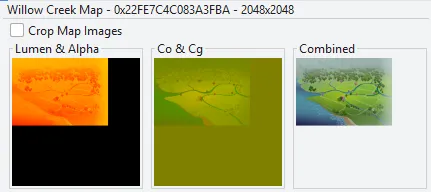
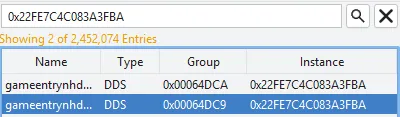
If you search the instance in the All Resources tab, you’ll see the two YCoCg parts. The combined image isn’t saved as a resource, it is generated as needed by both Sims 4 and S4E.
If you do care about technical details, you can learn more about YCoCg in the Images Article.
Exporting
Section titled “Exporting”Sims 4 Editor lets you export combined UI images as .png images.
S4E Homepage > Game File Browser > UI Images- Select an image, right click to export
- When exporting maps, you can select
Crop Map Images, explained further down.
- When exporting maps, you can select
Importing
Section titled “Importing”To have Sims 4 Editor import an image as YCoCg, add .ui before the image extension. For example: Willow Creek-0x22FE7C4C083A3FBA.ui.png. This will cause S4E to split the image into two YCoCg resources.
Map Overrides
Section titled “Map Overrides”When importing map images, use .map instead of .ui, making the more correct example Willow Creek-0x22FE7C4C083A3FBA.map.png. This will check the image size and uncrop if necessary.
Resolution
Section titled “Resolution”Because maps are heavily affected by the upscaling issue, you typically only want to use exported maps as a template, scale them to 2x the size, then create your new map using high resolution assets.
Cropping
Section titled “Cropping”Maps have a giant empty space in the bottom right because they are cropped by the game. S4E can automatically crop and uncrop map images to make them easier to work with.
When importing, using .map before the image extension causes S4E to make sure the image is one of the four valid sizes, and uncrops it if required. The valid sizes:
| Cropped | Uncropped | |
|---|---|---|
| Standard | 1536x1080 | 2048x2048 |
| HD (2x) | 3072x2160 | 4096x4096 |