
Modding 101
The Basics
Section titled “The Basics”Sims 4 Mods use exactly two file types, .package files and .ts4script files.
Most mods are made entirely using .package files, and will be the main focus of most tutorials. More advanced mods can use .ts4script files to use Python scripting, but this is often unneeded and won’t be discussed until later.
If mods use multiple files, they are distributed as .zip files, but should be unzipped when installing.
Package Files
Section titled “Package Files”Package files are a custom file type designed by Maxis that contains Resources. Because packages are nonstandard file types, they require programs like Sims 4 Editor or Sims 4 Studio to view and edit.
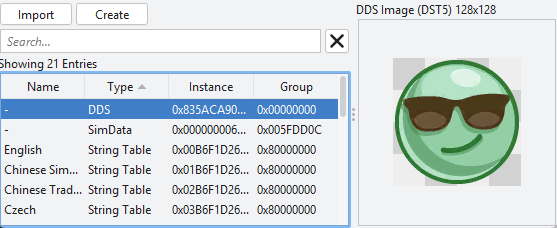 An example mod with a DDS image resource viewed in Sims 4 Editor.
Resources
Section titled “Resources”A resource is just a file that Sims 4 understands. Resources include text, XML, images, 3D models, animations, audio, etc. A resource is defined using a Resource Key.
Resource Keys
Section titled “Resource Keys”A resource key is a unique identifier for a resource. It has 3 parts: type, group, and instance. You can see these fields in the earlier image, with
Resource keys are used to either define new resources, or overriding existing resources. Resource keys will be discussed more in depth in the next section.
Summary
Section titled “Summary”How Mods Work
Section titled “How Mods Work”- Sims 4 loads all
.packageand.ts4sscriptfiles in the Sims 4Modsfolder Package Filescontain files calledResources, which are defined usingResources KeysResource Keysdetermine if a resource overrides an existing resource, or creates a new one.
Sims 4 Studio lets you edit many resources at once using the Studio view, or edit individual resources using the Warehouse view.
Sims 4 Editor currently only allows editing resources directly, similar to S4S’s Warehouse view.