
Image Overrides
Icon Overrides
Section titled “Icon Overrides”Icon overrides are extremely straight forward. Create a DDS resource with the instance of an existing icon. This example will replace the Ambitious Trait icon.
- On the S4E home page, open the Game File Browser then select the Icon Browser tab.
- Click on the icon you want to replace and copy the instance (
0xE9210ACE5B40E587).
- Create an image to use as a replacement. I’ll just export an existing image.

- Import the image into a package using the instance from step 2.

- Reap your ambitious rewards.
Menu Overrides
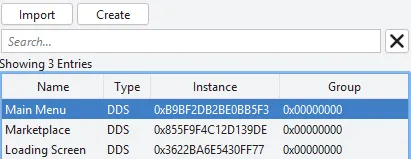
Section titled “Menu Overrides”The background image for the main menu, marketplace, and loading screen can be changed in the same way.
Menu images should have a 16:9 aspect ratio. The game uses 1280x720, and 1600x900, but 1920x1080 is also a good choice.
- Main Menu -
0xB9BF2DB2BE0BB5F3 - Marketplace -
0x855F9F4C12D139DE - Loading Screen -
0x3622BA6E5430FF77
Map Overrides
Section titled “Map Overrides”Map overrides are extremely similar, but they use a different image with just enough annoying details to warrant their own article.